
Write Pascal-style code, use any C and C++ library.
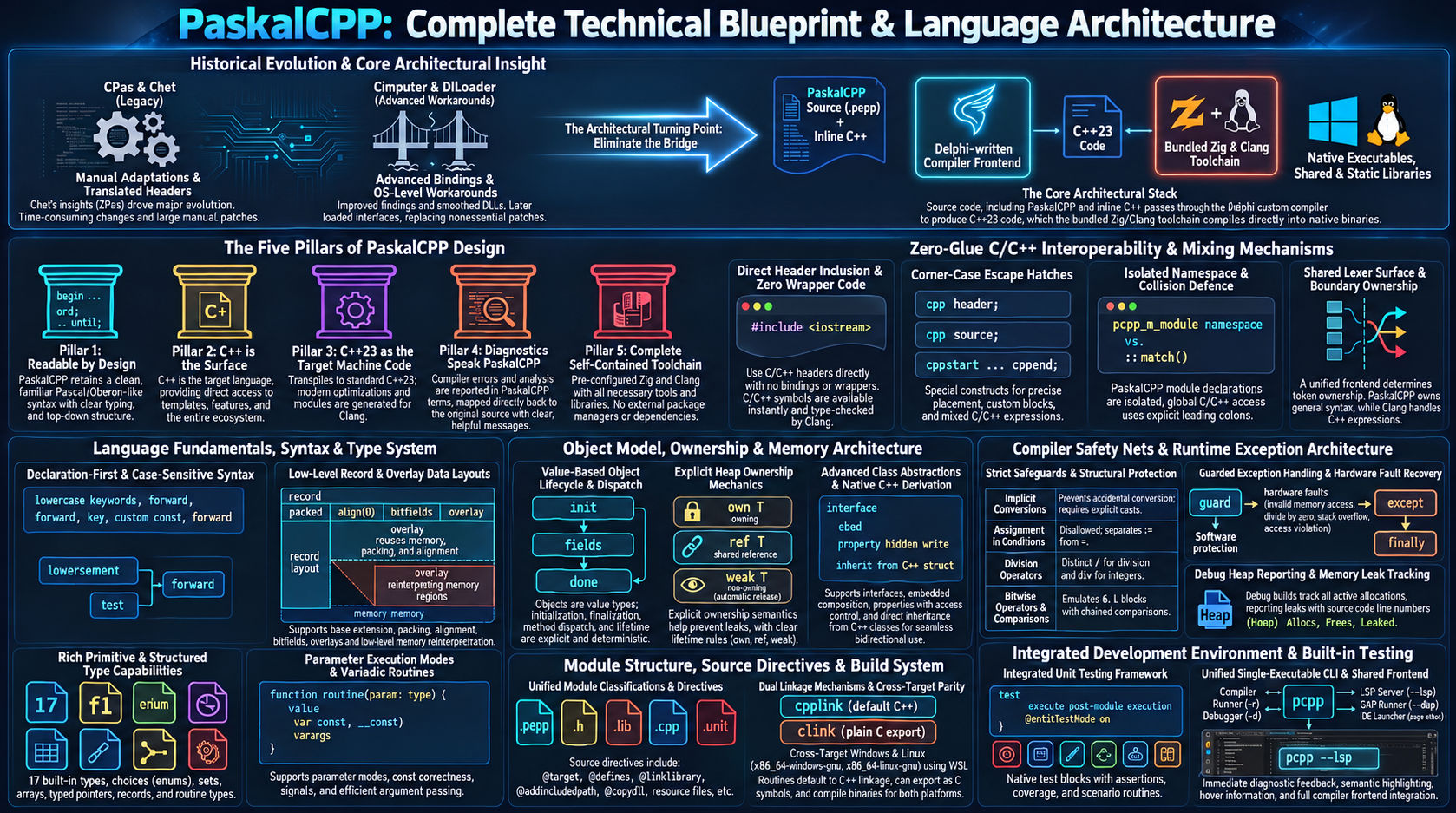
A minimal, Pascal and Oberon inspired systems programming language that compiles to C++23. #include any C or C++ header and call it: no bindings, no wrappers, and the toolchain ships with it.
- 17builtin types, plus every C and C++ type
- 2official targets, Windows x64 and Linux x64
- 4module kinds: exe, dll, lib, unit
- 3C++ forms for the corner cases
- 12asserts for the built-in tests
- 0bindings to write
C and C++ are part of the language
In a PaskalCPP source file, PaskalCPP code and C++ code sit side by side, freely mixed, in the same file. To use a C or C++ library, you #include its header and call it. No bindings to write. No wrapper generator. No header translation.
Readable by design
Pascal and Oberon style: blocks open and close with words, := assigns, = compares, every control-flow construct closes with its own word (end, or until for repeat).
C++ is the surface
A C++ type can be the type of a PaskalCPP variable, a C++ expression can sit inside a PaskalCPP expression, a C++ declaration can stand at module level.
C++23 is the machine code
PaskalCPP writes a C++23 header and source for each module, and the bundled clang compiles them.
Errors speak PaskalCPP
A PaskalCPP mistake is reported by PaskalCPP; what clang or the linker finds is mapped back to your .pcpp file, line and column.
The toolchain is in the box
PaskalCPP ships its own Zig and clang toolchain. One command turns a .pcpp file into a native binary.
If C++ can use it, PaskalCPP can use it
A C or C++ library is used from PaskalCPP as it is, with no binding layer in between.
- A library is used by
#include-ing its header and calling it. Its names are opaque to PaskalCPP and checked by clang. - Any C or C++ type is a type, written as C++ spells it:
unsigned int,std::vector<int>,struct tm. - C++ is written inside an expression as in C++:
std::max<int>(3, 9),LV.size(),new,delete,nullptr, lambdas. @linklibrary,@addlibrarypathand@addincludepathtell the build where a library lives, and@copydllputs a DLL beside the built program.
module exe cpp_mixing_std;

#include <string>
#include <vector>
#include <cmath>
#include <algorithm>

template<typename T>
T Max2(T a, T b) {
  return a > b ? a : b;
}

var
  LS: std::string;
  LV: std::vector<int>;
  LD: float64;
  LX: int32;

begin
  LS := "hello world";
  if LS.find("world") <> std::string::npos then
    println("found at {}", LS.find("world"));
  end;

  LV.push_back(3);
  LV.push_back(1);
  LV.push_back(2);
  std::sort(LV.begin(), LV.end());
  println("sorted {} {} {}", LV[0], LV[1], LV[2]);
  println("size {}", LV.size());

  LX := 3;
  LD := std::pow(float64(LX), 2.0);
  LX := Max2(LX, int32(LD));
  println("max {}", LX);
end.found at 6
sorted 1 2 3
size 3
max 9
[Heap] Allocs: 0, Frees: 0, Leaked: 0Two languages, one file
At module level a C++ struct, function, template or global stands beside PaskalCPP declarations and is used by them. For the cases plain mixing cannot express there are three forms, each with one job.
cpp header;
cpp source;
Where C++ goes
Chooses whether the plain C++ that follows is placed in the module's generated header or its source. The default is source.
cppstart source ... cppend;
A verbatim block
Macro-driven code, and in a body the C++ statements PaskalCPP has no form for. They use the PaskalCPP variables in scope.
cpp("1 + 2") * 3
A verbatim expression
Emitted in place and in parentheses, so cpp("1 + 2") * 3 is 9.
PaskalCPP does just enough C++ understanding to find where C++ begins and ends, then gets out of the way. PaskalCPP owns PaskalCPP, clang owns C++, and nobody second-guesses anybody.
A small, sharp set of constructs
The constructs PaskalCPP itself provides; C and C++ supply everything else.
Modules
Every source file is a module: an exe, a dll, a lib or a unit. import brings in PaskalCPP units, #include brings in C and C++. There is no project file and no build script.
Types
Seventeen builtin types, plus every C and C++ type. Records with extensions, packing, alignment and bitfields; overlays, choices, sets, static and dynamic arrays, pointers and routine types.
Objects as values
Methods, asked-for virtual dispatch, init and done, copy and move, own / ref / weak owners, interfaces, embeds, properties, operators, is and as, and derivation from C++ classes.
Exceptions
guard blocks with except and finally; a hardware fault inside a guard is caught as an exception and the program goes on, the same on both targets.
C linkage, both directions
clink gives a routine its plain, unmangled C name, so C code calls it, and anything that can call C can call it. external binds a routine to a symbol linked from elsewhere.
Unit testing built in
Test blocks follow the module's end.; @unitTestMode on; runs them with twelve asserts. The exit code is the number of failed tests, at most 255.
Your build lives in your source
Directives at the top of the main module set the target, the optimize level, libraries, include paths, the icon and version info, so one .pcpp file describes its own build.
No garbage collector
Memory is yours: raw blocks, records created and destroyed explicitly, dynamic arrays, objects held by own and ref, or anything C++ offers. A debug build counts heap blocks and owned objects, and names the line that built every object still alive at the end.
Checked on both targets
Every example on this page is a file built and run on x86_64-windows-gnu and x86_64-linux-gnu by its check; the output shown is the output it must print.
module exe testing_runner;

@unitTestMode on;

import testing_unit;

var
  GHits: int32 = 0;
  GText: string = "a";

initialize
begin
  println("main init");
end;

finalize
begin
  println("main final");
end;

begin
  println("the body does not run in test mode");
end.

test "asserts that hold"
var
  LP: ptr to int32;
  LW: uint32;
  LI: int32;
begin
  LP := address of GHits;
  LW := 7;
  LI := 2;
  testAssertNotNil(LP);
  testAssertEqualInt(16, testing_unit.Square(4));
  testAssertEqualInt(7, LW);
  testAssertEqualFloat(2.0, LI);
  testAssertEqualFloat(0.3, 0.1 + 0.2);
  testAssertEqualStr("ab", GText + "b");
end;

test "asserts that fail"
begin
  testAssertEqualInt(10, testing_unit.Square(3));
  testFail("still runs after a failure");
end;

test "a raise ends the test"
begin
  raisecode(7, "stop");
  testFail("never reached");
end;

test "a fault ends the test"
var
  LQ: ptr to int32;
begin
  LQ := nil;
  LQ^ := 1;
  testFail("never reached");
end;

test "returns early"
begin
  GHits := GHits + 1;
  return;
  testFail("never reached");
end;unit init
main init
╔══════════════════════════════════════════════════════════════╗
║ Unit Test Runner ║
╚══════════════════════════════════════════════════════════════╝
Running 6 test(s)...
✅ PASS: unit squares
✅ PASS: asserts that hold
❌ FAIL: asserts that fail
🔴 …/samples/testing_runner.pcpp:91: testAssertEqualInt failed: expected 10, got 9
🔴 …/samples/testing_runner.pcpp:92: testFail: still runs after a failure
❌ FAIL: a raise ends the test
🔴 …/samples/testing_runner.pcpp:95: test raised exception 7: stop
❌ FAIL: a fault ends the test
🔴 …/samples/testing_runner.pcpp:101: test raised exception 3: Access violation
✅ PASS: returns early
════════════════════════════════════════════════════════════════
Results: 3 passed, 3 failed, 6 total
════════════════════════════════════════════════════════════════
main final
unit final
[Heap] Allocs: 0, Frees: 0, Leaked: 0Unit testing built in
Testing is part of the language, not an add-on. This program imports a unit with tests of its own.
- Test blocks,
test "name" begin ... end;, follow the module'send.and see its routines, variables and imports. @unitTestMode on;runs the initialize sections, every imported unit's tests and the exe's own, then the finalize sections; the main body does not run.- A failed assert records its line and the test goes on; a raise or a fault fails that test and the runner goes on.
- The exit code is the number of failed tests, at most 255, the same on every target.
module exe objects_owners;

type
  TNode = object
    Name: int32;
    init(const AN: int32);
    begin
      self.Name := AN;
      println("init {}", self.Name);
    end;
    done;
    begin
      println("done {}", self.Name);
    end;
  end;
  TBase = object
    virtual method Speak();
    begin
      println("base");
    end;
    done;
    begin
      println("done base");
    end;
  end;
  TKid = object(TBase)
    override method Speak();
    begin
      println("kid");
    end;
    done;
    begin
      println("done kid");
    end;
  end;

routine Make(const AN: int32): own TNode;
begin
  return own TNode(AN);
end;

routine Owns();
var
  LO: own TNode;
  LB: own TBase;
begin
  LO := Make(1);
  LO.Name := 11;
  println("own {}", LO.Name);
  // An own of a polymorphic root frees the whole object
  LB := own TKid;
  LB.Speak();
end;

routine Shares();
var
  LA: ref TNode;
  LB: ref TNode;
  LW: weak TNode;
begin
  LA := ref TNode(2);
  LB := LA;
  LW := LA;
  println("alive {}", alive(LW));
  LA := nil;
  println("still {}", lock(LW).Name);
  // The last ref goes: the object ends
  LB := nil;
  println("alive {}", alive(LW));
end;

routine NilAccess();
var
  LO: own TNode;
begin
  guard
    println("{}", LO.Name);
  except
    println("nil {}", exccode());
  end;
end;

begin
  Owns();
  Shares();
  NilAccess();
end.init 1
own 11
kid
done kid
done base
done 11
init 2
alive true
still 2
done 2
alive false
nil 3
[Heap] Allocs: 3, Frees: 3, Leaked: 0Owners instead of a garbage collector
An object on the heap is held by an owner.
own Tis the sole owner,ref Tshares the object,weak Twatches it (alive,lock).initanddonerun when an object is built and when it ends; an own of a polymorphic root frees the whole object.- A member read through a nil own raises code 3, caught like any exception.
- A debug build counts heap blocks, records built with
createand own / ref objects and prints its heap report when the program ends.
module exe runtime_guards;

#include <stdexcept>

static void runtime_guards_std() {
  throw std::runtime_error("bad thing");
}

static void runtime_guards_int() {
  throw 42;
}

type
  TDigits = set of 0..9;

routine Deep(AN: int32): int32;
var
  LBuf: array[0..1023] of int64;
begin
  if AN = 0 then
    return 0;
  end;
  LBuf[0] := AN;
  return Deep(AN - 1) + int32(LBuf[0] mod 2);
end;

routine Show(const AWhat: string; ACode: int32; const AMsg: string);
begin
  println("{}: {} {}", AWhat, ACode, AMsg);
end;

var
  LP: ptr to int32;
  LZ: int32;
  LLow: int32;
  LN: int32;
  LK: int32;
  LS: TDigits;
  LF: float64;

begin
  LP := nil;
  LZ := 0;
  LLow := -2147483647 - 1;
  LK := 20;

  // a write through nil
  guard
    LP^ := 1;
  except
    Show("nil write", exccode(), excmsg());
  end;

  // integer division by zero
  guard
    LN := LLow div LZ;
  except
    Show("div 0", exccode(), excmsg());
  end;

  guard
    LN := LLow mod LZ;
  except
    Show("mod 0", exccode(), excmsg());
  end;

  // the lowest int32 divided by -1 overflows
  LN := -1;
  guard
    LN := LLow div LN;
  except
    Show("low div -1", exccode(), excmsg());
  end;

  LN := -1;
  guard
    LN := LLow mod LN;
  except
    Show("low mod -1", exccode(), excmsg());
  end;

  // a stack overflow, caught twice
  guard
    LN := Deep(1000000);
  except
    Show("deep", exccode(), excmsg());
  end;

  guard
    LN := Deep(1000000);
  except
    Show("deep again", exccode(), excmsg());
  end;

  // C++ exceptions thrown by the mixed C++ above
  guard
    runtime_guards_std();
  except
    Show("c++ std", exccode(), excmsg());
  end;

  guard
    runtime_guards_int();
  except
    Show("c++ int", exccode(), excmsg());
  end;

  // a set element outside the set type's range
  guard
    LS := [LK];
  except
    Show("set", exccode(), excmsg());
  end;

  // raises of your own
  guard
    raise("plain");
  except
    Show("raise", exccode(), excmsg());
  end;

  guard
    raisecode(0, "zero");
  except
    Show("raisecode 0", exccode(), excmsg());
  end;

  guard
    raisecode(-5, "neg");
  except
    Show("raisecode -5", exccode(), excmsg());
  end;

  // a float division by zero raises nothing
  LF := 1.0;
  LF := LF / 0.0;
  println("float / 0.0: {}", LF);

  // the program went on: a fault is caught again
  guard
    LP^ := 2;
  except
    Show("nil again", exccode(), excmsg());
  end;
end.nil write: 3 Access violation
div 0: 2 Divide by zero
mod 0: 2 Divide by zero
low div -1: 5 Numeric overflow
low mod -1: 5 Numeric overflow
deep: 4 Stack overflow
deep again: 4 Stack overflow
c++ std: 10 bad thing
c++ int: 10 unknown C++ exception
set: 11 set element 20 is out of range 0..9
raise: 1 plain
raisecode 0: 0 zero
raisecode -5: -5 neg
float / 0.0: inf
nil again: 3 Access violation
[Heap] Allocs: 0, Frees: 0, Leaked: 0Faults become exceptions
A hardware fault inside a guard is caught as an exception and the program goes on, the same on both targets.
- A write through nil is code 3
Access violation, an integer division by zero code 2, a stack overflow code 4. - A C++ exception is caught as code 10 with its
what()text. exccode()andexcmsg()read the exception in an except body.
module exe objects_cpp;

struct CShape {
  virtual ~CShape() = default;
  virtual int area() {
    return 0;
  }
  virtual int corners() const {
    return 0;
  }
  int sides = 0;
};

int cpp_area(CShape& s) {
  return s.area();
}

int cpp_corners(const CShape& s) {
  return s.corners();
}

type
  TSquare = object(CShape)
    S: int32;
    init(const AS: int32);
    begin
      self.S := AS;
      // sides is the C++ base's member
      self.sides := 4;
    end;
    override method area(): int32;
    begin
      return self.S * self.S;
    end;
    override const method corners(): int32;
    begin
      return self.sides;
    end;
  end;
  TRuler = object
    Len: int32;
    // A const method calls only const methods through self
    const method Size(): int32;
    begin
      return self.Twice();
    end;
    const method Twice(): int32;
    begin
      return self.Len * 2;
    end;
  end;

routine Measure(const AR: TRuler): int32;
begin
  return AR.Size();
end;

var
  LSq: TSquare(3);
  LR: TRuler;
begin
  println("{}", cpp_area(LSq));
  println("{} {}", LSq.sides, LSq.S);
  println("{}", cpp_corners(LSq));
  LR.Len := 6;
  println("{}", Measure(LR));
end.9
4 3
4
12
[Heap] Allocs: 0, Frees: 0, Leaked: 0Objects and C++ classes
The C++ struct is declared in the same file as the PaskalCPP object that derives from it.
- An object may derive from a C++ class and override its C++ virtual methods.
- C++ code calling through the C++ class runs the PaskalCPP body.
module exe types_records;

type
  TBase = record
    A: int32;
  end;
  // An extension holds every field of its chain
  TExt = record(TBase)
    B: int32;
  end;
  TPk = record packed
    X: int8;
    Y: int32;
  end;
  TBits = record
    S: int32 : 3;
    F: bool : 1;
  end;

routine ShowBase(const AB: TBase);
begin
  println("base {}", AB.A);
end;

var
  LE: TExt;
  LZ: TExt;
  LP: ptr to TBase;
  LB: TBits;

begin
  println("zero {} {}", LZ.A, LZ.B);
  // A record literal names the inherited fields too
  LE := TExt(A: 1, B: 2);
  println("literal {} {} size {}", LE.A, LE.B, size(TExt));
  ShowBase(LE);
  LP := address of LE;
  println("through base {}", LP^.A);
  println("packed {}", size(TPk));
  LB.S := -4;
  LB.F := true;
  println("bits {} {}", LB.S, LB.F);
end.zero 0 0
literal 1 2 size 8
base 1
through base 1
packed 5
bits -4 true
[Heap] Allocs: 0, Frees: 0, Leaked: 0Records
Plain data that starts zeroed.
- Extended by
record(TBase): an extension stands in for its base. packedwith no padding,align(n), bitfields.- Record literals such as
TR(B: 7).
module exe statements_guard_flow;

routine Find(): int32;
begin
  guard
    return 7;
  finally
    println("return finally");
  end;
end;

routine Handle(): int32;
begin
  guard
    raisecode(9, "nine");
  except
    print("except {}", exccode());
    return -1;
  finally
    println(" finally");
  end;
  return 0;
end;

var
  LI: int32;

begin
  for LI := 1 to 5 do
    guard
      if LI = 2 then
        print("skip {}", LI);
        skip;
      end;
      if LI = 3 then
        print("leave {}", LI);
        leave;
      end;
      print("pass {}", LI);
    finally
      println(" finally");
    end;
  end;
  println("loop done");
  println("found {}", Find());
  println("handled {}", Handle());
end.pass 1 finally
skip 2 finally
leave 3 finally
loop done
return finally
found 7
except 9 finally
handled -1
[Heap] Allocs: 0, Frees: 0, Leaked: 0Leaving a guard
guard blocks with except and finally sections.
leave,skipandreturnmay jump out of a guard.finallyruns on the way out, from the guard body and from an except body.
C's power without C's classic traps
Every one of these rules is enforced by the compiler, on PaskalCPP code, where they belong. The C++ in your file follows C++ rules, and clang checks it.
- No hidden conversions. A value converts implicitly only when every value it can hold fits the target exactly, in arithmetic too.
- Constants are checked. An overflow, a zero divisor or a shift count out of range is an error, never a silent wrap.
- One meaning per operator.
:=assigns and=compares, always;LX = 5;as a statement is an error. - Division says what it means.
/is real division, so7 / 2is 3.5;divandmodare the integer forms. - No precedence traps.
&and|bind like*and+:LA & 2 = 2means(LA & 2) = 2. - Comparisons do not chain.
a < b < cis an error, not a silent surprise. - Declare before use, everywhere. Mutual recursion is written with
forward, checked against the full declaration.
module exe expressions_power;

var
  LT: bool = true;
  LF: bool = false;
  LA: int32 = 6;
  LU: uint32 = 4;
  LC: char = 'a';
  LNeg: float64 = -3.75;
  LN8: int8 = 126;

begin
  println("shl before + {}", 1 + 2 shl 1);
  println("* before shl {}", 2 * 3 shl 1);
  println("& before = {}", LA & 2 = 2);
  println("not before = {}", not LT = LF);
  LC++;
  println("char step {}", LC);
  println("truncates {}", int32(LNeg));
  println("mixed sign {}", uint32(LA) + LU);
  println("test a bit {}", (LA & 1) <> 0);
  LN8 += 1;
  println("compound {}", LN8);
end.shl before + 5
* before shl 12
& before = true
not before = true
char step b
truncates -3
mixed sign 10
test a bit false
compound 127
[Heap] Allocs: 0, Frees: 0, Leaked: 0Reports point at your source
A PaskalCPP mistake is reported in PaskalCPP's words; what clang or the linker finds is mapped back to your .pcpp file, line and column.
PaskalCPP errors are PaskalCPP errors
A mistake on a PaskalCPP construct is reported by PaskalCPP itself, in its own words and types, with a note where one helps.
What only C++ can judge comes home
clang's and the linker's messages are mapped back to your .pcpp file, line and column; an undefined symbol is reported at the line that calls it.
One mistake, one report
A diagnostic is reported once per build; what PaskalCPP has already judged, clang never judges again.
Zero external toolchain
The Zig toolchain, and the clang compiler inside it, ship with PaskalCPP. zig build caches compiles, so unchanged code is not recompiled.
- Native executables, DLLs and static libraries for Windows x64 and Linux x64, built from one Windows machine, from the same source.
- A Linux build runs from the same machine through WSL:
pcpp <file> -r -t x86_64-linux-gnubuilds it, runs it and shows its output. - On Windows the binary is stamped with your icon and version information;
@copydllputs the DLLs it needs beside it. - The output is a plain native binary. No runtime to install, no virtual machine, no interpreter.
- CMake
- Makefiles
- Build scripts
- Header translation
- Bindings
- A project file
- PaskalCPP sourcemixed freely with C and C++
- PaskalCPP compilerwritten in Delphi
- C++23 header and sourceone pair per module
- Bundled Zig and clangthrough zig build
- Native exe, DLL or static libraryWindows or Linux
A development system, not just a transpiler
pcpp compiles, and it starts the other roles too. The compiler, the language server, the debugger and the editor share the compiler's own frontend: no second interpretation of PaskalCPP anywhere.
pcpp editor
The PaskalCPP Editor
An Electron application whose editing surface is Monaco. Build (Ctrl+B) and Run (Ctrl+F5) call pcpp with the toolbar's optimize level and target.
pcpp --lsp
The language server
Diagnostics as you type, hover with doc comments, go to definition, completion, inlay parameter names, the outline, workspace symbols, the call hierarchy and formatting. Any LSP client can use it.
pcpp --dap
The debugger
For x86_64-windows-gnu: breakpoints, continue, step over, into and out on PaskalCPP lines; variables and the call stack in PaskalCPP's names and types. pcpp <file> -d is the console debugger.
Anyone tired of writing bindings
Pascal and Delphi developers
Pascal and Oberon syntax, with every C and C++ library an #include away.
C++ developers
Pascal-style code beside your C++ in the same file, using the C++ libraries and templates you already use.
Systems programmers
Native binaries, pointers, raw memory and C linkage, with conversions and constants checked by the compiler.
Game developers
C and C++ game and multimedia libraries used by including their headers, with no bindings to maintain.
Library authors
Ship a C-linkage DLL or static library from a readable language.
Educators and learners
A systems language with Pascal-style syntax that reaches C and C++ directly.
From nothing to a native binary
PaskalCPP is free and open source under the Mozilla Public License 2.0. Releases, issues and the community live on GitHub.
-
Get PaskalCPP
Download the latest release from GitHub. The Zig and clang toolchain is inside; running a Linux build from Windows uses WSL.
-
Write a module
A module starts with its kind and name and ends with
end.; the smallest program is an exe whose body prints one line. -
Build and run it
pcpp hello.pcppbuilds;-rbuilds and runs;-tpicks the target. The debug build (the default) ends with the runtime's heap report. -
Open the editor
pcpp editorstarts the PaskalCPP Editor, with its language server and debugger. -
Read the docs
The tour walks through a first program and the language; the documentation covers the language, the build, and the tools.
module exe hello;

begin
  println("Hello from PaskalCPP!");
end.Hello from PaskalCPP!
[Heap] Allocs: 0, Frees: 0, Leaked: 0Build it with us
Share what you build, ask questions, report issues and help shape PaskalCPP.
The clarity of Pascal and the reach of C++, with nothing in between.
Every example on this page is built and run on both official targets.